Try on glasses with a photo.
Take it right, then check the size.
You can try on glasses with a photo: some online glasses stores’ virtual try-ons let you upload one instead of using the live camera, and the frames appear on it. Use a sharp, straight-on photo with your glasses off and even light on your face, taken from further away than a close selfie. A photo shows one angle, and the frame’s size on it is only as right as the try-on’s idea of how big your face is, so check the frame’s numbers too.
Updated
Live camera: turn your head
Take the photo
How to take a photo for a virtual try-on.
Six things that make it work.
The start is the same as any try-on: tap Try on on the frame’s page and, if the store asks, agree to its try-on terms (step by step in our try-on guide). Then choose the photo option. Stores ask for much the same photo (what they say); here is what helps:
-
01
Step back, then zoom in.
Don’t hold the phone close. Prop it up about 1.5 m (5 ft) away and use the timer, or ask someone to take it, zooming in rather than stepping closer.
-
02
Face the camera at eye level.
Look straight into the lens with the camera at the height of your eyes, not below your chin or above your head. Keep your head level, not tilted.
-
03
Glasses off, hair back.
Take your glasses off unless the store says its try-on removes them; otherwise the new frame sits over yours. Push your hair off your brows and behind your ears, so the frame’s top line and arms show.
-
04
Face the light.
Stand facing a window or a lamp, so the light is even on both sides of your face. No bright window behind you and no strong light from one side.
-
05
No filters.
Turn off beauty and face-slimming filters: they can change the shape of your face, and the frame is then placed on the changed face. Relax your face, with a closed mouth or a small smile.
-
06
Sharp and recent.
Use a photo in focus, with your whole face in the picture and nothing over your eyes or brows. A recent one shows your face and hair as they are now.
Why not a close selfie
A close selfie makes your nose look bigger.
Step back for a try-on photo.
Held close, the phone is much nearer your nose than your cheeks, so your nose comes out bigger. A facial plastic surgeon and a computer scientist calculated it for an average face: in a photo taken from about 30 cm (12 in), the base of the nose looks about 30% wider, relative to the width across the cheekbones, than in one taken from 1.5 m (5 ft).
A try-on puts the frame on the face in your photo. On a close selfie, you judge the frame on a face that isn’t quite yours. How to take a better photo.
Source: Ward and others, Nasal Distortion in Short-Distance Photographs: The Selfie Effect, JAMA Facial Plastic Surgery, 2018.
Close selfie 30 cm (12 in)
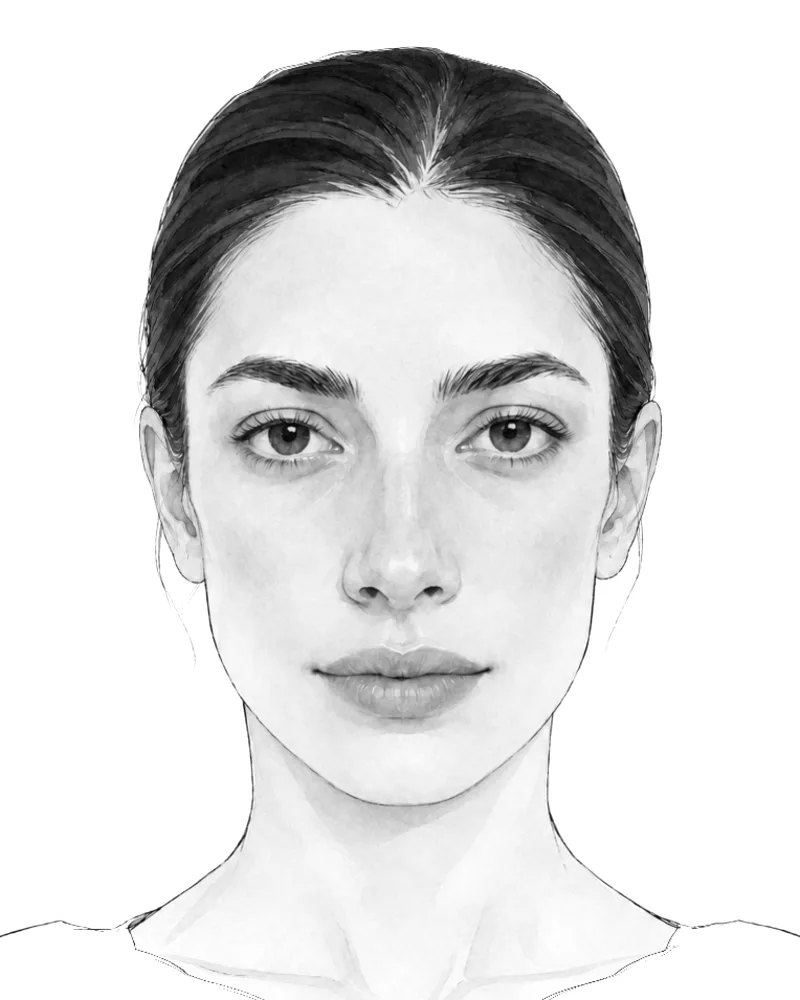
Step back 1.5 m (5 ft)
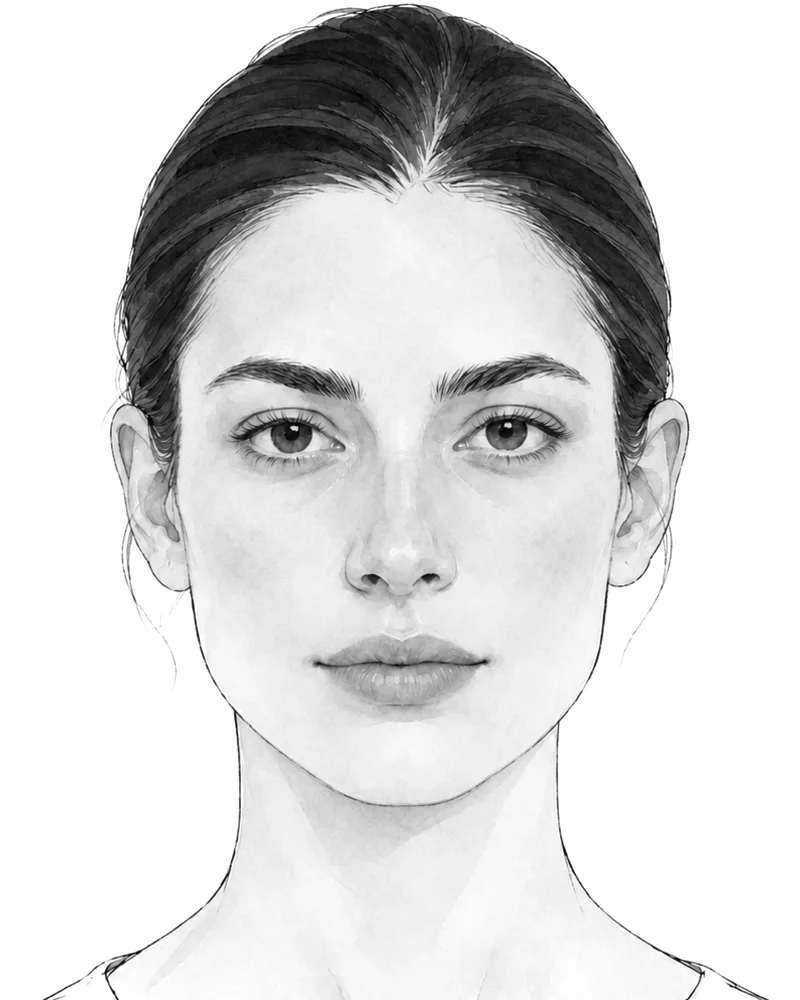
+30% wider nose base, next to the cheekbones, from 30 cm in the study
Illustration. The 30 cm drawing is the 1.5 m one re-projected with a camera at 30 cm.
Size on a photo
A photo has no ruler.
So how big is the frame on you?
- 85.6mm A card in the pictureThe width of a standard bank or ID card. Some try-ons let you hold a card against your forehead or in the picture: knowing its size, they can work out the size of your face, and of the frame on it. At the stores we checked, the card step used the live camera, not an uploaded photo.
- PDin mm Your PDThe distance between your pupils. Some try-ons, such as Zenni’s and GlassesShop’s, let you enter it so the frame is sized to your face. Measure it with your camera if you don’t know it. Measure your PD.
- ≈a guess NeitherWith no card and no PD, a try-on has to assume a typical face. The frame’s shape still shows; its size on you is a rough guide, so check the frame’s numbers. How to read them, or find your glasses size.
True-to-size try-on needs something of known size in the picture, such as a card, or a depth camera, one research paper notes (WSCG 2024). One brand’s try-on, Silhouette’s, offers an optional photo with a standard-sized card in it, so that “the size of the glasses is as true to reality as possible”.
Photo or live?
Photo or live camera?
Use both.
With a photo
- Works without a camera on the device, or the camera turned off
- Holds still: frame after frame on the same picture
- You can look at it with your own glasses back on
- Easy to send to a friend for a second opinion
- One angle: no sides, no turning your head
- An old photo may not show your face or hair as they are now
With the live camera
- Turn your head and see the sides
- Your face and your light as they are today
- Quick to flick through many frames
- Needs the camera
- Hard to judge without your glasses, unless the try-on lets you keep them on: take snapshots
The best of both: try frames live and turn your head, take a snapshot of each one you like, then compare the snapshots side by side with your own glasses back on. Neither shows how a frame feels on your nose and behind your ears (what any try-on can’t show).
Where to upload
Where to try on glasses with a photo.
Stores that take an upload.
Stores that take a photo
When we checked on November 19, 2026, these stores’ own sites said their try-ons take an uploaded photo (their words below). Look for the photo option after you open the try-on on a frame’s page.
- Zenni USUpload a photoCameraEnter PD
You can still preview the glasses on any photo of yourself by selecting ‘Upload Photo’ in the menu options.
- GlassesUSA USUpload a photoCamera
Take a selfie, or upload a picture with your face showing clearly.
- Eyeconic USUpload a photoCamera
Click ‘Virtual Try-On’ to use your camera or upload a photo.
- GlassesShop USUpload a photoCameraEnter PD
Cannot use a camera? Just use the image Try-On.
- Firmoo USUpload a photoEnter PD
Please select a picture with your face forward, centered, level, and no glasses.
- Payne Glasses USUpload a photoCamera
Simply upload a photo or use your webcam to access the feature …
Stores change their tools, and not every frame has a try-on. Others use the live camera; Specsavers in the UK, for one, lets you take a picture of the live try-on (stores with a live try-on).
Or take the photo in a live try‑on
In the LessLens app for iPhone, try frames from many brands live on your face, then tap the camera button to take a photo of yourself in the frame, and save it or send it to a friend. Free, for iPhones with Face ID.
Download on theApp StoreMost retailer links in the app are affiliate links: LessLens may earn a commission, and your price doesn’t change.
Photo questions
Good questions.
Straight answers.
Updated November 20, 2026.
Using the live camera? How to try on glasses online
Something else? Write to us
Can I try on glasses with a photo?
Yes, where the store’s try-on takes one. When we checked on November 19, 2026, Zenni, GlassesUSA, Eyeconic, GlassesShop, Firmoo and Payne Glasses said you can upload a photo: open the try-on on a frame’s page and look for the upload option.
What is the best photo for a virtual try-on?
A recent, sharp photo taken straight on, with the camera at eye level and about 1.5 m (5 ft) away, zoomed in, rather than a close selfie. Take your glasses off, push your hair off your brows, face the light and keep a relaxed face, with no beauty filter.
Why do glasses look too big or too small on my photo?
A photo has no ruler, so the try-on has to work out how big your face is. Unless it has your PD or a card of known size to go by, it assumes a typical face, and the frame can look a size off. A close selfie adds to it: it makes the middle of your face look bigger. Check the frame’s numbers against a pair that fits you. Find your glasses size.
Is it better to use a photo or the live camera?
Use both. The live camera shows the sides as you turn your head; a photo, or snapshots from a live try-on, lets you compare frames on the same picture with your own glasses back on. Neither shows how a frame feels on your nose and behind your ears. What any try-on can’t show.
Can an AI photo editor show me in glasses?
It can draw glasses onto a photo, but it draws a new picture: the glasses may not match a real frame’s shape, colour or size, and it may change your face too. To see a frame you can buy, use that store’s own try-on and compare it with the store’s photos of the frame.
What happens to my photo when I upload it?
It depends on the store, so read the try-on’s consent screen or help page first. When we checked on November 19, 2026, Zenni, Eyeconic and GlassesShop said try-on images stay on your device and aren’t stored by them, and Payne Glasses said it doesn’t store any information from its try-on. GlassesUSA’s consent terms said photos uploaded with a GlassesUSA account, or sent by email, may be kept for up to a year, and that you can delete them from your account at any time.
For eyewear stores
Sell glasses online?
Let shoppers see them on their face.
LessLens puts a Try on button on your product pages: shoppers see your frames on their own face, in the browser on computers and phones, and can save a photo of the try-on. Start with a pilot on your own frames.
- 60daysPilot, counted from the day the button goes live
- 20framesUp to 20 of your own frames in the pilot
- $0Subscription fee during the pilot; new 3D models of your frames are $39 each
About this guide
Written by the LessLens team. We make virtual try-on for online eyewear stores and the LessLens app for iPhone. The advice works with any store’s try-on. Store details were checked on each store’s own website on November 19, 2026.
Sources: each store’s own website, including Silhouette’s Virtual Try-On page; Ward, Ward, Fried and Paskhover, Nasal Distortion in Short-Distance Photographs: The Selfie Effect (JAMA Facial Plastic Surgery, 2018); Wu, Chen, Dellinger and Cheng, Real-Size Experience for Virtual Try-On (WSCG 2024); the card size is ISO/IEC 7810 ID-1 (85.60 × 53.98 mm).
LessLens for iPhone
See them on your face. Then decide.
Free on the App Store.
For iPhones with Face ID.
No iPhone? Use a store’s try-on in your browser (list above).